Category: Security

  • AWS CloudHSM is now PCI PIN certified

    AWS CloudHSM is now PCI PIN certified

    Amazon Web Services (AWS) is pleased to announce that AWS CloudHSM is certified for Payment Card Industry Personal Identification Number (PCI PIN) version 3.1.
    With CloudHSM, you can manage and access your keys on FIPS 140-2 Level 3 certified hardware, protected with customer-owned, single-tenant hardware security module (HSM) instances that run in your own virtual private cloud (VPC). This PCI PIN attestation gives you the flexibility to deploy your regulated workloads with reduced compliance overhead.
    Coalfire, a third-party Qualified Security Assessor (QSA), evaluated CloudHSM. Customers can access the PCI PIN Attestation of Compliance (AOC) report through AWS Artifact.
    To learn more about our PCI program and other compliance and security programs, see the AWS Compliance Programs page. As always, we value your feedback and questions; reach out to the AWS Compliance team through the Contact Us page.
     If you have feedback about this post, submit comments in the Comments section below. If you have questions about this post, contact AWS Support.
    Want more AWS Security news? Follow us on Twitter.

    Nivetha Chandran
    Nivetha is a Security Assurance Manager at Amazon Web Services on the Global Audits team, managing the PCI compliance program. Nivetha holds a Master’s degree in Information Management from the University of Washington.

    Powered by WPeMatico

  • Use AWS WAF CAPTCHA to protect your application against common bot traffic

    Use AWS WAF CAPTCHA to protect your application against common bot traffic

    In this blog post, you’ll learn how you can use a Completely Automated Public Turing test to tell Computers and Humans Apart (CAPTCHA) with other AWS WAF controls as part of a layered approach to provide comprehensive protection against bot traffic. We’ll describe a workflow that tracks the number of incoming requests to a site’s store page. The workflow then limits those requests if they exceed a certain threshold. Requests from IP addresses that exceed the threshold will be presented a CAPTCHA challenge to prove that the requests are being made by a human.
    Amazon Web Services (AWS) offers many tools and recommendations that companies can use as they face challenges with bot traffic on their websites. Web applications can be compromised through a variety of vectors, including cross-site scripting, SQL injection, path traversal, local file inclusion, and distributed denial-of-service (DDoS) attacks. AWS WAF offers managed rules that are designed to provide protection against common application vulnerabilities or other unwanted web traffic, without requiring you to write your own rules.
    There are some web attacks like web scraping, credential stuffing, and layer 7 DDoS attempts conducted by bots (as well as by humans) that target sensitive areas of your website, such as your store page. A CAPTCHA mitigates undesirable traffic by requiring the visitor to complete challenges before they are allowed to access protected resources. You can implement CAPTCHA to help prevent unwanted activities. Last year, AWS introduced AWS WAF CAPTCHA, which allows customers to set up AWS WAF rules that require CAPTCHA challenges to be completed for common targets such as forms (for example, search forms).
    Scenario
    Consider an attack where the unauthorized user is attempting to overwhelm a site’s store page by repeatedly sending search requests for different items.
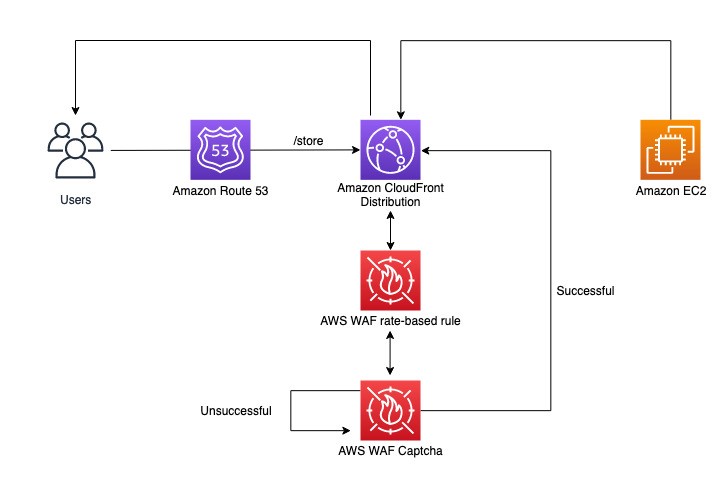
    Assume that traffic visits a website that is hosted through Amazon CloudFront and attempts the above behavior on the /store URL. In this scenario, there is a rate-based rule in place that will track the number of requests coming in from each IP. This rate-based rule tracks the rate of requests for each originating IP address and invokes the rule action on IPs with rates that go over the limit. With CAPTCHA implemented as the rule action, excessive attempts to search within a 5-minute window will result in a CAPTCHA challenge being presented to the user. This workflow is shown in Figure 1.

    Figure 1: User visits a store page and is evaluated by a rate-based rule

    When a user solves a CAPTCHA challenge, AWS automatically generates and encrypts a token and sends it to the client as a cookie. The client requests aren’t challenged again until the token has expired. AWS WAF calculates token expiration by using the immunity time configuration. You can configure the immunity time in a web access control list (web ACL) CAPTCHA configuration and in the configuration for a rule’s action setting. When a user provides an incorrect answer to a CAPTCHA challenge, the challenge informs the user and loads a new puzzle. When the user solves the challenge, the challenge automatically submits the original web request, updated with the CAPTCHA token from the successful puzzle completion.
    Walkthrough
    This workflow will require an AWS WAF rule within a new or existing rule group or web ACL. The rule will define how web requests are inspected and the action to take.
    To create an AWS WAF rate-based rule

    Open the AWS WAF console and in the left navigation pane, choose Web ACLs.
    Choose an existing web ACL, or choose Create web ACL at the top right to create a new web ACL.
    Under Rules, choose Add rules, and then in the drop-down list, choose Add my own rules and rule groups.
    For Rule type, choose Rule builder.
    In the Rule builder section, for Name, enter your rule name. For Type, choose Rate-based rule.
    In the Request rate details section, enter your rate limit (for example, 100). For IP address to use for rate limiting, choose Source IP address, and for Criteria to count requests toward rate limit, choose Only consider requests that match criteria in a rule statement.
    For Count only the requests that match the following statement, choose Matches the statement from the drop-down list.
    In the Statement section, for Inspect, choose URI path. For Match type , choose Contains string.
    For String to match, enter the URI path of your web page (for example, /store).
    In the Action section, choose CAPTCHA.
    (Optional) For Immunity time, choose Set a custom immunity time for this rule, or keep the default value (300 seconds).
    To finish, choose Add rule, and then choose Save to add the rule to your web ACL.

    After you add the rule, go to the Rules tab of your web ACL and navigate to your rule. Confirm that the output resembles what is shown in Figure 2. You should have a rate-based rule with a scope-down statement that matches the store URI path you entered earlier, and the action should be set to CAPTCHA.

    Figure 2: Finished rate-based rule with CAPTCHA action

    The following is the JSON for the CAPTCHA rule that you just created. You can use this to validate your configuration. You can also use this JSON in the rule builder while creating the rule.
    {
    “Name”: “CaptchaOnRBR”,
    “Priority”: 0,
    “Statement”: {
    “RateBasedStatement”: {
    “Limit”: 100,
    “AggregateKeyType”: “IP”,
    “ScopeDownStatement”: {
    “ByteMatchStatement”: {
    “SearchString”: “/store”,
    “FieldToMatch”: {
    “UriPath”: {}
    },
    “TextTransformations”: [
    {
    “Priority”: 0,
    “Type”: “NONE”
    }
    ],
    “PositionalConstraint”: “CONTAINS”
    }
    }
    }
    },
    “Action”: {
    “Captcha”: {}
    },
    “VisibilityConfig”: {
    “SampledRequestsEnabled”: true,
    “CloudWatchMetricsEnabled”: true,
    “MetricName”: “CaptchaOnRBR”
    },
    “CaptchaConfig”: {
    “ImmunityTimeProperty”: {
    “ImmunityTime”: 60
    }
    }
    }
    After you complete this configuration, the rule will be invoked when an IP address unsuccessfully attempts to search the store at a rate that exceeds the threshold. This user will be presented with a CAPTCHA challenge, as shown in Figure 6. If the user is successful, they will be routed back to the store page. Otherwise, they will be served a new puzzle until it is solved.

    Figure 3: CAPTCHA challenge presented to a request that exceeded the threshold

    Implementing rate-based rules and CAPTCHA also allows you to track IP addresses, limit the number of invalid search attempts, and use the specific IP information available to you within sampled requests and AWS WAF logs to work to prevent that traffic from affecting your resources. Additionally, you have visibility into IPs addresses blocked by rate-based rules so that you can later add these addresses to a block list or create custom logic as needed to mitigate false positives.
    Conclusion
    In this blog post, you learned how to configure and deploy a CAPTCHA challenge with AWS WAF that checks for web requests that exceed a certain rate threshold and requires the client sending such requests to solve a challenge. Please note the additional charge for enabling CAPTCHA on your web ACL (pricing can be found here). Although CAPTCHA challenges are simple for humans to complete, they should be harder for common bots to complete with any meaningful rate of success. You can use a CAPTCHA challenge when a block action would stop too many legitimate requests, but letting all traffic through would result in unacceptably high levels of unwanted requests, such as from bots.
    For more information and guidance on AWS WAF rate-based rules, see the blog post The three most important AWS WAF rate-based rules and the AWS whitepaper AWS Best Practices for DDoS Resiliency. You can also check out these additional resources:

    Using AWS WAF with CAPTCHA (YouTube video)
    Best practices for using the CAPTCHA and Challenge actions (AWS WAF Developer Guide)
    Reduce Unwanted Traffic on Your Website with New AWS WAF Bot Control
    Fine-tune and optimize AWS WAF Bot Control mitigation capability
    Detect and block advanced bot traffic

     If you have feedback about this blog post, submit comments in the Comments section below. You can also start a new thread on AWS WAF re:Post to get answers from the community.
    Want more AWS Security news? Follow us on Twitter.

    Abhinav Bannerjee
    Abhinav is a Solutions Architect based out of Texas. He works closely with small to medium sized businesses to help them scale their adoption of Amazon Web Services.

    Fenil Patel
    Fenil is a Solutions Architect based out of New Jersey. His main focus is helping customers optimize and secure content delivery using AWS Edge Services.

    Powered by WPeMatico

  • Fall 2022 SOC reports now available in Spanish

    Fall 2022 SOC reports now available in Spanish

    Spanish version >>
    We continue to listen to our customers, regulators, and stakeholders to understand their needs regarding audit, assurance, certification, and attestation programs at Amazon Web Services (AWS). We are pleased to announce that Fall 2022 System and Organization Controls (SOC) 1, SOC 2, and SOC 3 reports are now available in Spanish. These translated reports will help drive greater engagement and alignment with customer and regulatory requirements across Latin America and Spain.
    The Spanish language version of the reports does not contain the independent opinion issued by the auditors or the control test results, but you can find this information in the English language version. Stakeholders should use the English version as a complement to the Spanish version.
    Translated SOC reports in Spanish are available to customers through AWS Artifact. Translated SOC reports in Spanish will be published twice a year, in alignment with the Fall and Spring reporting cycles.
    We value your feedback and questions—feel free to reach out to our team or give feedback about this post through the Contact Us page.
    If you have feedback about this post, submit comments in the Comments section below.
    Want more AWS Security news? Follow us on Twitter.
     

    Spanish
    Los informes SOC de Otoño de 2022 ahora están disponibles en español
    Seguimos escuchando a nuestros clientes, reguladores y partes interesadas para comprender sus necesidades en relación con los programas de auditoría, garantía, certificación y atestación en Amazon Web Services (AWS). Nos complace anunciar que los informes SOC 1, SOC 2 y SOC 3 de AWS de Otoño de 2022 ya están disponibles en español. Estos informes traducidos ayudarán a impulsar un mayor compromiso y alineación con los requisitos regulatorios y de los clientes en las regiones de América Latina y España.
    La versión en inglés de los informes debe tenerse en cuenta en relación con la opinión independiente emitida por los auditores y los resultados de las pruebas de controles, como complemento de las versiones en español.
    Los informes SOC traducidos en español están disponibles en AWS Artifact. Los informes SOC traducidos en español se publicarán dos veces al año según los ciclos de informes de Otoño y Primavera.
    Valoramos sus comentarios y preguntas; no dude en ponerse en contacto con nuestro equipo o enviarnos sus comentarios sobre esta publicación a través de nuestra página Contáctenos.
    Si tienes comentarios sobre esta publicación, envíalos en la sección Comentarios a continuación.
    ¿Desea obtener más noticias sobre seguridad de AWS? Síguenos en Twitter.

    Rodrigo Fiuza
    Rodrigo is a Security Audit Manager at AWS, based in São Paulo. He leads audits, attestations, certifications, and assessments across Latin America, Caribbean and Europe. Rodrigo has previously worked in risk management, security assurance, and technology audits for the past 12 years.

    Andrew Najjar
    Andrew is a Compliance Program Manager at Amazon Web Services. He leads multiple security and privacy initiatives within AWS and has 8 years of experience in security assurance. Andrew holds a master’s degree in information systems and bachelor’s degree in accounting from Indiana University. He is a CPA and AWS Certified Solution Architect – Associate.

    Ryan Wilks
    Ryan is a Compliance Program Manager at Amazon Web Services. He leads multiple security and privacy initiatives within AWS. Ryan has 11 years of experience in information security and holds ITIL, CISM and CISA certifications.

    Nathan Samuel
    Nathan is a Compliance Program Manager at Amazon Web Services. He leads multiple security and privacy initiatives within AWS. Nathan has a Bachelors of Commerce degree from the University of the Witwatersrand, South Africa and has 17 years’ experience in security assurance and holds the CISA, CRISC, CGEIT, CISM, CDPSE and Certified Internal Auditor certifications.

    Powered by WPeMatico

  • C5 Type 2 attestation report now available with 156 services in scope

    C5 Type 2 attestation report now available with 156 services in scope

    We continue to expand the scope of our assurance programs at Amazon Web Services (AWS), and we are pleased to announce that AWS has successfully completed the 2022 Cloud Computing Compliance Controls Catalogue (C5) attestation cycle with 156 services in scope. This alignment with C5 requirements demonstrates our ongoing commitment to adhere to the heightened expectations for cloud service providers. AWS customers in Germany and across Europe can run their applications on AWS Regions in scope of the C5 report with the assurance that AWS aligns with C5 requirements.
    The C5 attestation scheme is backed by the German government and was introduced by the Federal Office for Information Security (BSI) in 2016. AWS has adhered to the C5 requirements since their inception. C5 helps organizations demonstrate operational security against common cyberattacks when using cloud services within the context of the German Government’s Security Recommendations for Cloud Computing Providers.
    Independent third-party auditors evaluated AWS for the period October 1, 2021, through September 30, 2022. The C5 report illustrates AWS’ compliance status for both the basic and additional criteria of C5. Customers can download the C5 report through AWS Artifact. AWS Artifact is a self-service portal for on-demand access to AWS compliance reports. Sign in to AWS Artifact in the AWS Management Console, or learn more at Getting Started with AWS Artifact.
    AWS has added the following 16 services to the current C5 scope:

    Amazon AppFlow
    AWS App Runner
    AWS Application Migration Service
    AWS CloudShell
    Amazon DevOps Guru
    AWS Elastic Disaster Recovery
    Amazon HealthLake
    AWS IoT SiteWise
    AWS Lake Formation
    Amazon Location Service
    Amazon Managed Services for Prometheus
    Amazon MemoryDB for Redis
    AWS Private Certificate Authority
    AWS Resource Access Manager
    AWS Signer
    Amazon WorkSpaces Web

    At present, the services offered in the Frankfurt, Dublin, London, Paris, Milan, Stockholm and Singapore Regions are in scope of this certification. For up-to-date information, see the AWS Services in Scope by Compliance Program page and choose C5.
    AWS strives to continuously bring services into the scope of its compliance programs to help you meet your architectural and regulatory needs. If you have questions or feedback about C5 compliance, reach out to your AWS account team.
    To learn more about our compliance and security programs, see AWS Compliance Programs. As always, we value your feedback and questions; reach out to the AWS Compliance team through the Contact Us page.
    If you have feedback about this post, submit comments in the Comments section below.
    Want more AWS Security how-to content, news, and feature announcements? Follow us on Twitter.

    Julian Herlinghaus
    Julian is a Manager in AWS Security Assurance based in Berlin, Germany. He leads third-party and customer security audits across Europe and specifically the DACH region. He has previously worked as Information Security department lead of an accredited certification body and has multiple years of experience in information security and security assurance & compliance.

    Andreas Terwellen
    Andreas is a senior manager in security audit assurance at AWS, based in Frankfurt, Germany. His team is responsible for third-party and customer audits, attestations, certifications, and assessments across Europe. Previously, he was a CISO in a DAX-listed telecommunications company in Germany. He also worked for different consulting companies managing large teams and programs across multiple industries and sectors.

    Powered by WPeMatico

  • Fall 2022 PCI DSS report available with six services added to compliance scope

    Fall 2022 PCI DSS report available with six services added to compliance scope

    We’re continuing to expand the scope of our assurance programs at Amazon Web Services (AWS) and are pleased to announce that six additional services have been added to the scope of our Payment Card Industry Data Security Standard (PCI DSS) certification. This provides our customers with more options to process and store their payment card data and architect their cardholder data environment (CDE) securely on AWS.
    You can see the full list of services on our Services in Scope by Compliance program page. The six additional services are:

    AWS CloudShell
    AWS Elastic Disaster Recovery
    Amazon Managed Services for Prometheus
    Amazon Managed Workflows for Apache Airflow (Amazon MWAA)
    AWS Signer
    Amazon WorkSpaces Web

    AWS was evaluated by Coalfire, a third-party Qualified Security Assessor (QSA). Customers can access the Attestation of Compliance (AOC) report demonstrating our PCI compliance status through AWS Artifact.
    To learn more about our PCI program and other compliance and security programs, see the AWS Compliance Programs page. As always, we value your feedback and questions; reach out to the AWS Compliance team through the Contact Us page.
    Want more AWS Security news? Follow us on Twitter.

    Michael Oyeniya
    Michael is a Compliance Program Manager at AWS on the Global Audits team, managing the PCI compliance program. He holds a Master’s degree in management and has over 18 years of experience in information technology security risk and control.

    Powered by WPeMatico

  • AWS achieves HDS certification in two additional Regions

    AWS achieves HDS certification in two additional Regions

    We’re excited to announce that two additional AWS Regions—Asia Pacific (Jakarta) and Europe (Milan)—have been granted the Health Data Hosting (Hébergeur de Données de Santé, HDS) certification. This alignment with HDS requirements demonstrates our continued commitment to adhere to the heightened expectations for cloud service providers. AWS customers who handle personal health data can use HDS-certified Regions with confidence to manage their workloads.
    The following 18 Regions are in scope for this certification:

    US East (Ohio)
    US East (Northern Virginia)
    US West (Northern California)
    US West (Oregon)
    Asia Pacific (Jakarta)
    Asia Pacific (Seoul)
    Asia Pacific (Mumbai)
    Asia Pacific (Singapore)
    Asia Pacific (Sydney)
    Asia Pacific (Tokyo)
    Canada (Central)
    Europe (Frankfurt)
    Europe (Ireland)
    Europe (London)
    Europe (Milan)
    Europe (Paris)
    Europe (Stockholm)
    South America (São Paulo)

    Introduced by the French governmental agency for health, Agence Française de la Santé Numérique (ASIP Santé), the HDS certification aims to strengthen the security and protection of personal health data. Achieving this certification demonstrates that AWS provides a framework for technical and governance measures to secure and protect personal health data, governed by French law.
    Independent third-party auditors evaluated and certified AWS on January 13, 2023. The Certificate of Compliance that demonstrates AWS compliance status is available on the Agence du Numérique en Santé (ANS) website and AWS Artifact. AWS Artifact is a self-service portal for on-demand access to AWS compliance reports. Sign in to AWS Artifact in the AWS Management Console, or learn more at Getting Started with AWS Artifact.
    For up-to-date information, including when additional Regions are added, see the AWS Compliance Programs page, and choose HDS.
    AWS strives to continuously bring services into the scope of its compliance programs to help you meet your architectural and regulatory needs. If you have questions or feedback about HDS compliance, reach out to your AWS account team.
    To learn more about our compliance and security programs, see AWS Compliance Programs. As always, we value your feedback and questions; reach out to the AWS Compliance team through the Contact Us page.
    If you have feedback about this post, submit comments in the Comments section below.
    Want more AWS Security news? Follow us on Twitter.

    Janice Leung
    Janice is a security audit program manager at AWS, based in New York. She leads security audits across Europe and previously worked in security assurance and technology risk management in the financial industry for 11 years.

    Powered by WPeMatico

  • How to encrypt sensitive caller voice input in Amazon Lex

    How to encrypt sensitive caller voice input in Amazon Lex

    In the telecommunications industry, sensitive authentication and user data are typically received through mobile voice and keypads, and companies are responsible for protecting the data obtained through these channels. The increasing use of voice-driven interactive voice response (IVR) has resulted in a need to provide solutions that can protect user data that is gathered from mobile voice inputs. In this blog post, you’ll see how to protect a caller’s sensitive voice data that was captured through Amazon Lex by using data encryption implemented through AWS Lambda functions. The solution described in this post helps you to protect customer data received through voice channels from inadvertent or unknown access. The solution also includes decryption capabilities, which give an authorized administrator or operator the ability to decrypt user data from a Lambda console.
    Solution overview
    To demonstrate the IVR solution described in this post, a caller speaks two sensitive pieces of data—credit card number and zip code—from an Amazon Connect contact flow. The spoken values are encrypted and returned to the contact flow to be stored in contact attributes. The encrypted ciphertext is retained as a contact attribute for decryption purposes. Amazon CloudWatch Logs is enabled in the contact flow, but only the encrypted values are logged in log streams.
    For this solution, conversation logs for this Amazon Lex bot are not enabled. An operator with assigned AWS Identity and Access Management (IAM) permissions can monitor the logged encrypted entries from CloudWatch Logs. For more information, see Working with log groups and log streams in the Amazon CloudWatch Logs User Guide.
    Solution architecture
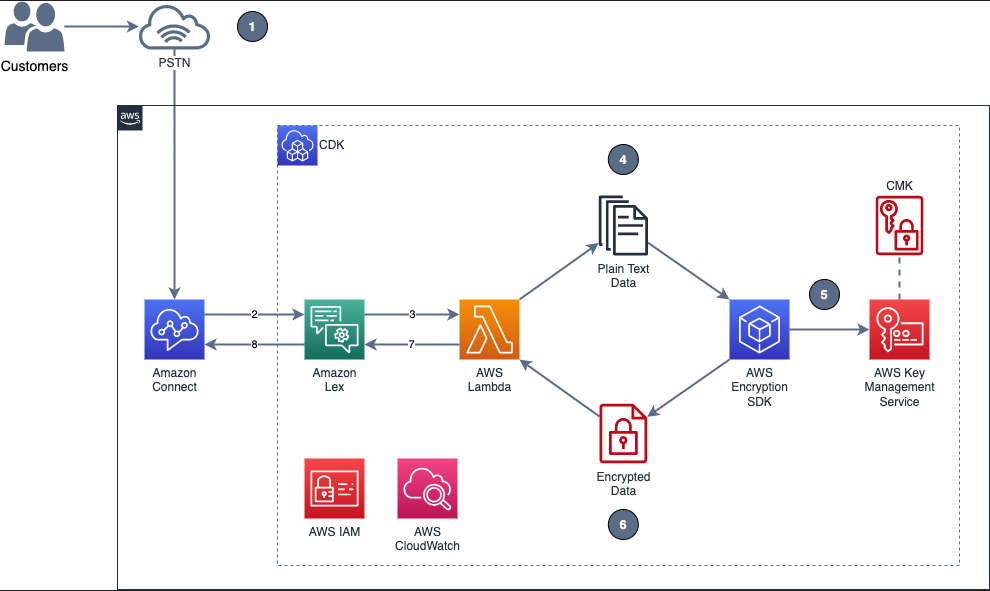
    Figure 1 shows the overview of the solution described in this blog post.

    Figure 1: Example of solution architecture

    Figure 1 shows the following high-level steps of the solution, and the number labels correspond to the following steps.

    A caller places an inbound call.
    An Amazon Connect contact flow leverages a Get customer input block, backed by an Amazon Lex bot, to prompt the caller for numerical data.
    The Amazon Lex bot invokes the Lambda function dev-encryption-core-EncryptFn.
    The Lambda function uses the AWS Encryption SDK to encrypt the caller’s plain text data.
    The AWS Encryption SDK obtains encryption keys from AWS Key Management Service (AWS KMS).
    The caller’s data is encrypted by using the AWS KMS keys obtained from AWS KMS.
    The Lambda function appends the encrypted data to the Amazon Lex bot session attributes.
    Amazon Lex returns the fully encrypted data back to Amazon Connect.

    Overview of a contact flow

    Figure 2: Contact flow captures input values using Amazon Lex and returns their encrypted values

    Figure 2 shows an overview of the contact flow, which has two main steps:

    The first numerical data (in this example, an encrypted credit card number value) is stored in contact attributes.
    The second numerical data (in this example, an encrypted zip code value) is stored in contact attributes.

    Prerequisites
    This solution uses the following AWS services:

    Amazon Connect
    AWS Identity and Access Management (IAM)
    AWS Key Management Service (AWS KMS)
    AWS Lambda
    Amazon Lex

    The following need to be installed in your local machine:

    Git
    Node and NPM (14.x or higher)
    TypeScript
    AWS Cloud Development Kit (AWS CDK) 2.0 or higher

    To implement the solution in this post, you first need the Amazon Connect instance prerequisite in place.
    To set up the Amazon Connect instance (if none exists)

    Create an Amazon Connect instance with a claimed phone number and a configured Amazon Connect user linked to a basic routing profile. For more information about setting up a contact center, see Set up your contact center in the Amazon Connect Administrator Guide.
    Assign the CallCenterManager or Admin security profile to an Amazon Connect user.
    In the newly created Amazon Connect instance, under the Overview section, find the access URL with the format https://.awsapps.com/connect/login

    Make note of the access URL, which you will use later to log in to the Amazon Connect Dashboard.

    Log in to your Amazon Connect instance with a Connect user that has Admin or CallCenterManager permissions.

    Solution procedures
    This solution includes the following procedures:

    Clone the project or download the solution zip file.
    Create AWS resources needed for encryption and decryption.
    Configure the Amazon Lex bot in Amazon Connect.
    Create the contact flow in Amazon Connect.
    Validate the solution.
    Decrypt the collected data.

    To clone or download the solution

    Log in to the GitHub repo.
    Clone or download the solution files to your local machine.

    The downloaded file contains the artifacts needed for the deployment.
    To create AWS resources needed for encryption and decryption

    From the command line, change directory to the project’s root directory.
    Run npm install.
    Run npm run build to transpile TypeScript to JavaScript and package code and its dependencies before deploying to AWS.
    Run cdk deploy CoreStack.

    To configure the Amazon Lex bot in your Amazon Connect instance

    In the Amazon Connect console, choose Contact flows and scroll to the Amazon Lex section.

    Figure 3: Select Contact flows

    From the Bot menu, select secure_LexInput(Classic). Then select +Add Amazon Lex Bot.

    Figure 4: Configure the Amazon Lex bot to Amazon Connect

    To import contact flow into Amazon Connect

    In the Amazon Connect console, choose Overview, and then choose Login as administrator.
    From the Routing menu on the left side, choose Contact flows to show the list of contact flows.
    Choose Create Contact flow.
    Choose the arrow to the right of the Save button and choose Import flow (beta). This imports the contact flow that you previously downloaded in the procedure To clone or download the solution. The contact flow already has the Amazon Lex bot configured.

    Figure 5: Select Import flow (beta)

    In the upper right corner of the contact flow, choose Save, and then choose OK to save the changes.
    Choose Publish to make the contact flow ready for use during the validation steps.
    (Optional) Claim a phone number (if none is available), using the following steps:

    In the Connect Dashboard, on the navigation menu, choose Channels, and then choose Phone numbers.
    On the right side of the page, choose Claim a number.
    Select the DID (Direct Inward Dialing) tab. Use the drop-down arrow to choose your country/region. When numbers are returned, choose one.
    Write down the phone number. You call it later in this post.

    (Optional) On the Edit Phone number page, in the Description box, you can type a note if desired.
    To assign the contact flow to your claimed phone number, for Contact flow / IVR, choose the drop-down arrow, and then choose Secure_Lex_Input.
    Choose Save.

    Figure 6: Under Contact flow / IVR, select the imported contact flow

    For more information, see Set up phone numbers for your contact center in the Amazon Connect Administrator Guide.
    To validate the solution

    Dial the test phone number to go through the voice prompt flow.
    When prompted, speak a 16-digit credit card number (you have a maximum of two retries), then speak a 5-digit zip code (also a maximum of two retries).
    After you complete your test call, review the log streams in Amazon CloudWatch Logs to confirm that the digits that you entered are now encrypted and stored as a contact attribute. The two entered values zipcode and creditcard are stored in contact attributes. Both are encrypted.

    Figure 7: Sample log showing encrypted values for zipcode and creditcard

    Log in to your Amazon Connect Dashboard as a Supervisor. The URL is provided after the connect instance has been created. In the navigation menu, choose Contact search.

    Figure 8: Choose Contact search to look for the call information

    Locate your inbound call on the Contact search list. Note that it can take up to 60 seconds for data to appear in the Contact search list.
    Select the Contact ID for your call.

    Figure 9: The Contact search showing the contact details for your test call

    Copy the encrypted values for creditcard and zipcode and make note of them; you will use these values in the next procedure.

    Figure 10: Contact attributes stored in a contact flow are registered as part of the contact details

    To decrypt the collected data

    In the AWS Lambda console, choose Functions.
    Use the Search bar to look for the dev-encryption-core-DecryptFn Lambda function, and then select the name link to open it.
    Under folder encryption-master, open the test folder. Under the tab events, locate the file decrypt.json.
    Use the following steps to create a sample test event in the console by using the contents from decrypt.json. For more details, see Testing Lambda functions in the console.

    Choose the down arrow on the right side of Test.
    Choose Configure test event.
    Choose Create new test event.
    For Event name, enter decryptTest.
    Paste the contents from decrypt.json.

    {
    “Details”: {
    “Parameters”: {
    “encrypted”: “”
    }
    }
    }

    Choose Save.

    Use the encrypted values saved in the Validate a solution procedure and replace the ones in the recently created test event.

    Figure 11: Replace the creditcard or zipCode values with the ones from the Contact Search page

    Choose Test. The output from the test shows the values decrypted by the Lambda function. This is shown in Figure 12 under the Execution result tab.

    Figure 12: Result from the decryption operation

    Note: Make sure that only the appropriate authorized administrator or operator, application, or AWS service is able to invoke the decryption Lambda function.

    You have now successfully implemented the solution by encrypting and decrypting the voice input of your test call, which you collected through Amazon Lex.
    Cleanup
    To avoid incurring future charges, follow these steps to clean up the deployed resources that you created when implementing this solution.
    To delete the Amazon Connect instance

    In the Amazon Connect console, under Instance alias, select the name of the Amazon Connect instance, and choose Delete.
    When prompted, type the name of the instance, and then choose Delete.

    To delete the Amazon Lex bot

    In the Amazon Lex console, choose the bot that you created in the To configure the Amazon Lex bot procedure.
    Choose Delete, and then choose Continue.

    To delete the AWS CloudFormation stack

    In the AWS CloudFormation console, on the Stacks page, select the stack you created in the procedure To create AWS resources needed for encryption and decryption.
    In the stack details pane, choose Delete.
    Choose Delete stack when prompted. This deletes the Amazon S3 bucket, IAM roles and AWS Lambda functions you created for testing. This will also schedule a deletion date on the AWS KMS key.

    Conclusion
    In this post, you learned how an Amazon Connect contact flow can collect voice inputs from a caller by using Amazon Lex, and how you can encrypt these inputs by using your own AWS KMS key. This solution can help improve the security of voice input that is collected through Amazon Connect. For cost information, see the Amazon Connect pricing page.
    For more information, see the blog post Creating a secure IVR solution with Amazon Connect and the topic Encrypt customer input (using OpenSSL) in the Amazon Connect Administrator Guide. As previously mentioned, the increasing use of voice-driven IVR has resulted in a need to provide solutions that can protect user data gathered from mobile voice inputs.
    Additional resources include the AWS Lambda Developer Guide, the Amazon Lex Developer Guide, the Amazon Connect Administrator Guide, the AWS Nodejs SDK, and the AWS SDK for Python (Boto3).
    If you need help with setting up this solution, you can get assistance from AWS Professional Services. You can also seek assistance from Amazon Connect partners available worldwide.
     If you have feedback about this post, submit comments in the Comments section below. If you have questions about this post, contact AWS Support.
    Want more AWS Security news? Follow us on Twitter.

    Herbert Guerrero
    Herbert is a Senior Proserve Consultant for Connect. He enjoys designing and developing high-usability and scalable solutions. Understanding success criteria helps Herbert work backwards and deliver well-architected solutions. His engineering background informs the way he engages with customers’ mental models of what their solutions should look like.

    Ed Valdez
    Ed is a Specialty Consultant with Amazon Web Services. As a software development professional with over 23 years of experience, he specializes on designing and delivering customer-centric solutions within the contact center domain.

    Powered by WPeMatico

  • How to revoke federated users’ active AWS sessions

    How to revoke federated users’ active AWS sessions

    When you use a centralized identity provider (IdP) for human user access, changes that an identity administrator makes to a user within the IdP won’t invalidate the user’s existing active Amazon Web Services (AWS) sessions. This is due to the nature of session durations that are configured on assumed roles. This situation presents a challenge for identity administrators.
    In this post, you’ll learn how to revoke access to specific users’ sessions on AWS assumed roles through the use of AWS Identity and Access Management (IAM) policies and service control policies (SCPs) via AWS Organizations.
    Session duration overview
    When you configure IAM roles, you have the option of configuring a maximum session duration that specifies how long a session is valid. By default, the temporary credentials provided to the user will last for one hour, but you can change this to a value of up to 12 hours.
    When a user assumes a role in AWS by using their IdP credentials, that role’s credentials will remain valid for the length of their session duration. It’s convenient for end users to have a maximum session duration set to 12 hours, because this prevents their sessions from frequently timing out and then requiring re-login. However, a longer session duration also poses a challenge if you, as an identity administrator, attempt to revoke or modify a user’s access to AWS from your IdP.
    For example, user John Doe is leaving the company and you want to verify that John has his privileges within AWS revoked. If John has access to IAM roles with long-session durations, then he might have residual access to AWS despite having his session revoked or his user identity deleted within the IdP. Perhaps John assumed a role for his daily work at 8 AM and then you revoked his credentials within the IdP at 9 AM. Because John had already assumed an AWS role, he would still have access to AWS through that role for the duration of the configured session, 8 PM if the session was configured for 12 hours. Therefore, as a security best practice, AWS recommends that you do not set the session duration length longer than is needed. This example is displayed in Figure 1.

    Figure 1: Session duration overview

    In order to restrict access despite the session duration being active, you could update the roles that are assumable from an IdP with a deny-all policy or delete the role entirely. However, this is a disruptive action for the users that have access to this role. If the role was deleted or the policy was updated to deny all, then users would no longer be able to assume the role or access their AWS environment. Instead, the recommended approach is to revoke access based on the specific user’s principalId or sourceIdentity values.
    The principalId is the unique identifier for the entity that made the API call. When requests are made with temporary credentials, such as assumed roles through IdPs, this value also includes the session name, such as JohnDoe@example.com. The sourceIdentity identifies the original user identity that is making the request, such as a user who is authenticated through SAML federation from an IdP. As a best practice, AWS recommends that you configure this value within the IdP, because this improves traceability for user sessions within AWS. You can find more information on this functionality in the blog post, How to integrate AWS STS SourceIdentity with your identity provider.
    Identify the principalId and sourceIdentity by using CloudTrail
    You can use AWS CloudTrail to review the actions taken by a user, role, or AWS service that are recorded as events. In the following procedure, you will use CloudTrail to identify the principalId and sourceIdentity contained in the CloudTrail record contents for your IdP assumed role.
    To identify the principalId and sourceIdentity by using CloudTrail

    Assume a role in AWS by signing in through your IdP.
    Perform an action such as a creating an S3 bucket.
    Navigate to the CloudTrail service.
    In the navigation pane, choose Event History.
    For Lookup attributes, choose Event name. For Event name, enter CreateBucket.

    Figure 2: Looking up the CreateBucket event in the CloudTrail event history

    Select the corresponding event record and review the event details. An example showing the userIdentity element is as follows.

    “userIdentity”: {
    “type”: “AssumedRole”,
    “principalId”:
    “AROATVGBKRLCHXEXAMPLE:JohnDoe@example.com”,
    “arn”: “arn:aws:sts::111122223333:assumed-
    role/roleexample/JohnDoe@example.com”,
    “accountId”: “111122223333”,
    “accessKeyId”: “ASIATVGBKRLCJEXAMPLE”,
    “sessionContext”: {
    “sessionIssuer”: {
    “type”: “Role”,
    “principalId”: “AROATVGBKRLCHXEXAMPLE”,
    “arn”:
    “arn:aws:iam::111122223333:role/roleexample”,
    “accountId”: “111122223333”,
    “userName”: “roleexample”
    },
    “webIdFederationData”: {},
    “attributes”: {
    “creationDate”: “2022-07-05T15:48:28Z”,
    “mfaAuthenticated”: “false”
    },
    “sourceIdentity”: “JohnDoe@example.com”
    }
    }

    In this event record, you can see that principalId is “AROATVGBKRLCHXEXAMPLE:JohnDoe@example.com” and sourceIdentity was specified as “JohnDoe@example.com”. Now that you have these values, let’s explore how you can revoke access by using SCP and IAM policies.
    Use an SCP to deny users based on IdP user name or revoke session token
    First, you will create an SCP, a policy that can be applied to an organization to offer central control of the maximum available permissions across the accounts in the organization. More information on SCPs, including steps to create and apply them, can be found in the AWS Organizations User Guide.
    The SCP will have a deny-all statement with a condition for aws:userid, which will evaluate the principalId field; and a condition for aws:SourceIdentity, which will evaluate the sourceIdentity field. In the following example SCP, the users John Doe and Mary Major are prevented from accessing AWS, in member accounts, regardless of their session duration, because each action will check against their aws:userid and aws:SourceIdentity values and be denied accordingly.
    SCP to deny access based on IdP user name

    {
    “Version”: “2012-10-17”,
    “Statement”: [
    {
    “Effect”: “Deny”,
    “Action”: “*”,
    “Resource”: “*”,
    “Condition”: {
    “StringLike”: {
    “aws:userid”: [
    “*:JohnDoe@example.com”,
    “*:MaryMajor@example.com”
    ]
    }
    }
    },
    {
    “Effect”: “Deny”,
    “Action”: “*”,
    “Resource”: “*”,
    “Condition”: {
    “StringEquals”: {
    “aws:SourceIdentity”: [
    “JohnDoe@example.com”,
    “MaryMajor@example.com”
    ]
    }
    }
    }
    ]
    }

    Use an IAM policy to revoke access in the AWS Organizations management account
    SCPs do not affect users or roles in the AWS Organizations management account and instead only affect the member accounts in the organization. Therefore, using an SCP alone to deny access may not be sufficient. However, identity administrators can revoke access in a similar way within their management account by using the following procedure.
    To create an IAM policy in the management account

    Sign in to the AWS Management Console by using your AWS Organizations management account credentials.
    Follow these steps to use the JSON policy editor to create an IAM policy. Use the JSON of the SCP shown in the preceding section, SCP to deny access based on IdP user name, in the IAM JSON editor.
    Follow these steps to add the IAM policy to roles that IdP users may assume within the account.

    Revoke active sessions when role chaining
    At this point, the user actions on the IdP assumable roles within the AWS organization have been blocked. However, there is still an edge case if the target users use role chaining (use an IdP assumedRole credential to assume a second role) that uses a different RoleSessionName than the one assigned by the IdP. In a role chaining situation, the users will still have access by using the cached credentials for the second role.
    This is where the sourceIdentity field is valuable. After a source identity is set, it is present in requests for AWS actions that are taken during the role session. The value that is set persists when a role is used to assume another role (role chaining). The value that is set cannot be changed during the role session. Therefore, it’s recommended that you configure the sourceIdentity field within the IdP as explained previously. This concept is shown in Figure 3.

    Figure 3: Role chaining with sourceIdentity configured

    A user assumes an IAM role via their IdP (#1), and the CloudTrail record displays sourceIdentity: JohnDoe@example.com (#2). When the user assumes a new role within AWS (#3), that CloudTrail record continues to display sourceIdentity: JohnDoe@example.com despite the principalId changing (#4).
    However, if a second role is assumed in the account through role chaining and the sourceIdentity is not set, then it’s recommended that you revoke the issued session tokens for the second role. In order to do this, you can use the SCP policy at the end of this section, SCP to revoke active sessions for assumed roles. When you use this policy, the issued credentials related to the roles specified will be revoked for the users currently using them, and only users who were not denied through the previous SCP or IAM policies restricting their aws:userid will be able to reassume the target roles to obtain a new temporary credential.
    If you take this approach, you will need to use an SCP to apply across the organization’s member accounts. The SCP must have the human-assumable roles for role chaining listed and a token issue time set to a specific time when you want users’ access revoked. (Normally, this time window would be set to the present time to immediately revoke access, but there might be circumstances in which you wish to revoke the access at a future date, such as when a user moves to a new project or team and therefore requires different access levels.) In addition, you will need to follow the same procedures in your management account by creating a customer-managed policy by using the same JSON with the condition statement for aws:PrincipalArn removed. Then attach the customer managed policy to the individual roles that are human-assumable through role chaining.
    SCP to revoke active sessions for assumed roles

    {
    “Version”: “2012-10-17”,
    “Statement”: [
    {
    “Sid”: “RevokeActiveSessions”,
    “Effect”: “Deny”,
    “Action”: [
    “*”
    ],
    “Resource”: [
    “*”
    ],
    “Condition”: {
    “StringEquals”: {
    “aws:PrincipalArn”: [
    “arn:aws:iam:::role/”,
    “arn:aws:iam:::role/”
    ]
    },
    “DateLessThan”: {
    “aws:TokenIssueTime”: “2022-06-01T00:00:00Z”
    }
    }
    }
    ]
    }

    Conclusion and final recommendations
    In this blog post, I demonstrated how you can revoke a federated user’s active AWS sessions by using SCPs and IAM policies that restrict the use of the aws:userid and aws:SourceIdentity condition keys. I also shared how you can handle a role chaining situation with the aws:TokenIssueTime condition key.
    This exercise demonstrates the importance of configuring the session duration parameter on IdP assumed roles. As a security best practice, you should set the session duration to no longer than what is needed to perform the role. In some situations, that could mean an hour or less in a production environment and a longer session in a development environment. Regardless, it’s important to understand the impact of configuring the maximum session duration in the user’s environment and also to have proper procedures in place for revoking a federated user’s access.
    This post also covered the recommendation to set the sourceIdentity for assumed roles through the IdP. This value cannot be changed during role sessions and therefore persists when a user conducts role chaining. Following this recommendation minimizes the risk that a user might have assumed another role with a different session name than the one assigned by the IdP and helps prevent the edge case scenario of revoking active sessions based on TokenIssueTime.
    You should also consider other security best practices, described in the Security Pillar of the AWS Well-Architected Framework, when you revoke users’ AWS access. For example, rotating credentials such as IAM access keys in situations in which IAM access keys are regularly used and shared among users. The example solutions in this post would not have prevented a user from performing AWS actions if that user had IAM access keys configured for a separate IAM user in the environment. Organizations should limit long-lived security credentials such as IAM keys and instead rotate them regularly or avoid their use altogether. Also, the concept of least privilege is highly important to limit the access that users have and scope it solely to the requirements that are needed to perform their job functions. Lastly, you should adopt a centralized identity provider coupled with the AWS IAM Identity Center (successor to AWS Single Sign-On) service in order to centralize identity management and avoid the need for multiple credentials for users.
    If you have feedback about this post, submit comments in the Comments section below. If you have questions about this post, start a new thread on the AWS Identity and Access Management re:Post or contact AWS Support.
    Want more AWS Security news? Follow us on Twitter.

    Matt Howard
    Matt is a Principal Technical Account Manager (TAM) for AWS Enterprise Support. As a TAM, Matt provides advocacy and technical guidance to help customers plan and build solutions using AWS best practices. Outside of AWS, Matt enjoys spending time with family, sports, and video games.

    Powered by WPeMatico

  • Three key security themes from AWS re:Invent 2022

    Three key security themes from AWS re:Invent 2022

    AWS re:Invent returned to Las Vegas, Nevada, November 28 to December 2, 2022. After a virtual event in 2020 and a hybrid 2021 edition, spirits were high as over 51,000 in-person attendees returned to network and learn about the latest AWS innovations.
    Now in its 11th year, the conference featured 5 keynotes, 22 leadership sessions, and more than 2,200 breakout sessions and hands-on labs at 6 venues over 5 days.
    With well over 100 service and feature announcements—and innumerable best practices shared by AWS executives, customers, and partners—distilling highlights is a challenge. From a security perspective, three key themes emerged.

    Turn data into actionable insights
    Security teams are always looking for ways to increase visibility into their security posture and uncover patterns to make more informed decisions. However, as AWS Vice President of Data and Machine Learning, Swami Sivasubramanian, pointed out during his keynote, data often exists in silos; it isn’t always easy to analyze or visualize, which can make it hard to identify correlations that spark new ideas.

    “Data is the genesis for modern invention.” – Swami Sivasubramanian, AWS VP of Data and Machine Learning

    At AWS re:Invent, we launched new features and services that make it simpler for security teams to store and act on data. One such service is Amazon Security Lake, which brings together security data from cloud, on-premises, and custom sources in a purpose-built data lake stored in your account. The service, which is now in preview, automates the sourcing, aggregation, normalization, enrichment, and management of security-related data across an entire organization for more efficient storage and query performance. It empowers you to use the security analytics solutions of your choice, while retaining control and ownership of your security data.
    Amazon Security Lake has adopted the Open Cybersecurity Schema Framework (OCSF), which AWS cofounded with a number of organizations in the cybersecurity industry. The OCSF helps standardize and combine security data from a wide range of security products and services, so that it can be shared and ingested by analytics tools. More than 37 AWS security partners have announced integrations with Amazon Security Lake, enhancing its ability to transform security data into a powerful engine that helps drive business decisions and reduce risk. With Amazon Security Lake, analysts and engineers can gain actionable insights from a broad range of security data and improve threat detection, investigation, and incident response processes.
    Strengthen security programs
    According to Gartner, by 2026, at least 50% of C-Level executives will have performance requirements related to cybersecurity risk built into their employment contracts. Security is top of mind for organizations across the globe, and as AWS CISO CJ Moses emphasized during his leadership session, we are continuously building new capabilities to help our customers meet security, risk, and compliance goals.
    In addition to Amazon Security Lake, several new AWS services announced during the conference are designed to make it simpler for builders and security teams to improve their security posture in multiple areas.
    Identity and networking
    Authorization is a key component of applications. Amazon Verified Permissions is a scalable, fine-grained permissions management and authorization service for custom applications that simplifies policy-based access for developers and centralizes access governance. The new service gives developers a simple-to-use policy and schema management system to define and manage authorization models. The policy-based authorization system that Amazon Verified Permissions offers can shorten development cycles by months, provide a consistent user experience across applications, and facilitate integrated auditing to support stringent compliance and regulatory requirements.
    Additional services that make it simpler to define authorization and service communication include Amazon VPC Lattice, an application-layer service that consistently connects, monitors, and secures communications between your services, and AWS Verified Access, which provides secure access to corporate applications without a virtual private network (VPN).
    Threat detection and monitoring
    Monitoring for malicious activity and anomalous behavior just got simpler. Amazon GuardDuty RDS Protection expands the threat detection capabilities of GuardDuty by using tailored machine learning (ML) models to detect suspicious logins to Amazon Aurora databases. You can enable the feature with a single click in the GuardDuty console, with no agents to manually deploy, no data sources to enable, and no permissions to configure. When RDS Protection detects a potentially suspicious or anomalous login attempt that indicates a threat to your database instance, GuardDuty generates a new finding with details about the potentially compromised database instance. You can view GuardDuty findings in AWS Security Hub, Amazon Detective (if enabled), and Amazon EventBridge, allowing for integration with existing security event management or workflow systems.
    To bolster vulnerability management processes, Amazon Inspector now supports AWS Lambda functions, adding automated vulnerability assessments for serverless compute workloads. With this expanded capability, Amazon Inspector automatically discovers eligible Lambda functions and identifies software vulnerabilities in application package dependencies used in the Lambda function code. Actionable security findings are aggregated in the Amazon Inspector console, and pushed to Security Hub and EventBridge to automate workflows.
    Data protection and privacy
    The first step to protecting data is to find it. Amazon Macie now automatically discovers sensitive data, providing continual, cost-effective, organization-wide visibility into where sensitive data resides across your Amazon Simple Storage Service (Amazon S3) estate. With this new capability, Macie automatically and intelligently samples and analyzes objects across your S3 buckets, inspecting them for sensitive data such as personally identifiable information (PII), financial data, and AWS credentials. Macie then builds and maintains an interactive data map of your sensitive data in S3 across your accounts and Regions, and provides a sensitivity score for each bucket. This helps you identify and remediate data security risks without manual configuration and reduce monitoring and remediation costs.
    Encryption is a critical tool for protecting data and building customer trust. The launch of the end-to-end encrypted enterprise communication service AWS Wickr offers advanced security and administrative controls that can help you protect sensitive messages and files from unauthorized access, while working to meet data retention requirements.
    Management and governance
    Maintaining compliance with regulatory, security, and operational best practices as you provision cloud resources is key. AWS Config rules, which evaluate the configuration of your resources, have now been extended to support proactive mode, so that they can be incorporated into infrastructure-as-code continuous integration and continuous delivery (CI/CD) pipelines to help identify noncompliant resources prior to provisioning. This can significantly reduce time spent on remediation.
    Managing the controls needed to meet your security objectives and comply with frameworks and standards can be challenging. To make it simpler, we launched comprehensive controls management with AWS Control Tower. You can use it to apply managed preventative, detective, and proactive controls to accounts and organizational units (OUs) by service, control objective, or compliance framework. You can also use AWS Control Tower to turn on Security Hub detective controls across accounts in an OU. This new set of features reduces the time that it takes to define and manage the controls required to meet specific objectives, such as supporting the principle of least privilege, restricting network access, and enforcing data encryption.
    Do more with less
    As we work through macroeconomic conditions, security leaders are facing increased budgetary pressures. In his opening keynote, AWS CEO Adam Selipsky emphasized the effects of the pandemic, inflation, supply chain disruption, energy prices, and geopolitical events that continue to impact organizations.
    Now more than ever, it is important to maintain your security posture despite resource constraints. Citing specific customer examples, Selipsky underscored how the AWS Cloud can help organizations move faster and more securely. By moving to the cloud, agricultural machinery manufacturer Agco reduced costs by 78% while increasing data retrieval speed, and multinational HVAC provider Carrier Global experienced a 40% reduction in the cost of running mission-critical ERP systems.

    “If you’re looking to tighten your belt, the cloud is the place to do it.” – Adam Selipsky, AWS CEO

    Security teams can do more with less by maximizing the value of existing controls, and bolstering security monitoring and analytics capabilities. Services and features announced during AWS re:Invent—including Amazon Security Lake, sensitive data discovery with Amazon Macie, support for Lambda functions in Amazon Inspector, Amazon GuardDuty RDS Protection, and more—can help you get more out of the cloud and address evolving challenges, no matter the economic climate.
    Security is our top priority
    AWS re:Invent featured many more highlights on a variety of topics, such as Amazon EventBridge Pipes and the pre-announcement of GuardDuty EKS Runtime protection, not to mention Amazon CTO Dr. Werner Vogels’ keynote and the security partnerships showcased on the Expo floor. It was a whirlwind week, but one thing is clear: AWS is working harder than ever to make our services better and to collaborate on solutions that ease the path to proactive security, so that you can focus on what matters most—your business.
    For more security-related announcements and on-demand sessions, see Recap to security, identity, and compliance sessions at AWS re:Invent 2022 and the AWS re:Invent Security, Identity, and Compliance playlist on YouTube.
    If you have feedback about this post, submit comments in the Comments section below.

    Anne Grahn
    Anne is a Senior Worldwide Security GTM Specialist at AWS based in Chicago. She has more than a decade of experience in the security industry, and has a strong focus on privacy risk management. She maintains a Certified Information Systems Security Professional (CISSP) certification.

    Paul Hawkins
    Paul helps customers of all sizes understand how to think about cloud security so they can build the technology and culture where security is a business enabler. He takes an optimistic approach to security and believes that getting the foundations right is the key to improving your security posture.

    Powered by WPeMatico

  • Recap to security, identity, and compliance sessions at AWS re:Invent 2022

    Recap to security, identity, and compliance sessions at AWS re:Invent 2022

    AWS re:Invent returned to Las Vegas, NV, in November 2022. The conference featured over 2,200 sessions and hands-on labs and more than 51,000 attendees over 5 days. If you weren’t able to join us in person, or just want to revisit some of the security, identity, and compliance announcements and on-demand sessions, this blog post is for you.

    Key announcements
    Here are some of the security announcements that we made at AWS re:Invent 2022.

    We announced the preview of a new service, Amazon Security Lake. Amazon Security Lake automatically centralizes security data from cloud, on-premises, and custom sources into a purpose-built data lake stored in your AWS account. Security Lake makes it simpler to analyze security data so that you can get a more complete understanding of security across your entire organization. You can also improve the protection of your workloads, applications, and data. Security Lake automatically gathers and manages your security data across accounts and AWS Regions.
    We introduced the AWS Digital Sovereignty Pledge—our commitment to offering the most advanced set of sovereignty controls and features available in the cloud. As part of this pledge, we launched a new feature of AWS Key Management Service, External Key Store (XKS), where you can use your own encryption keys stored outside of the AWS Cloud to protect data on AWS.
    To help you with the building blocks for zero trust, we introduced two new services:

    AWS Verified Access provides secure access to corporate applications without a VPN. Verified Access verifies each access request in real time and only connects users to the applications that they are allowed to access, removing broad access to corporate applications and reducing the associated risks.
    Amazon Verified Permissions is a scalable, fine-grained permissions management and authorization service for custom applications. Using the Cedar policy language, Amazon Verified Permissions centralizes fine-grained permissions for custom applications and helps developers authorize user actions in applications.

    We announced Automated sensitive data discovery for Amazon Macie. This new capability helps you gain visibility into where your sensitive data resides on Amazon Simple Storage Service (Amazon S3) at a fraction of the cost of running a full data inspection across all your S3 buckets. Automated sensitive data discovery automates the continual discovery of sensitive data and potential data security risks across your S3 storage aggregated at the AWS Organizations level.
    Amazon Inspector now supports AWS Lambda functions, adding continual, automated vulnerability assessments for serverless compute workloads. Amazon Inspector automatically discovers eligible AWS Lambda functions and identifies software vulnerabilities in application package dependencies used in the Lambda function code. The functions are initially assessed upon deployment to Lambda and continually monitored and reassessed, informed by updates to the function and newly published vulnerabilities. When vulnerabilities are identified, actionable security findings are generated, aggregated in Amazon Inspector, and pushed to Security Hub and Amazon EventBridge to automate workflows.
    Amazon GuardDuty now offers threat detection for Amazon Aurora to identify potential threats to data stored in Aurora databases. Currently in preview, Amazon GuardDuty RDS Protection profiles and monitors access activity to existing and new databases in your account, and uses tailored machine learning models to detect suspicious logins to Aurora databases. When a potential threat is detected, GuardDuty generates a security finding that includes database details and contextual information on the suspicious activity. GuardDuty is integrated with Aurora for direct access to database events without requiring you to modify your databases.
    AWS Security Hub is now integrated with AWS Control Tower, allowing you to pair Security Hub detective controls with AWS Control Tower proactive or preventive controls and manage them together using AWS Control Tower. Security Hub controls are mapped to related control objectives in the AWS Control Tower control library, providing you with a holistic view of the controls required to meet a specific control objective. This combination of over 160 detective controls from Security Hub, with the AWS Control Tower built-in automations for multi-account environments, gives you a strong baseline of governance and off-the-shelf controls to scale your business using new AWS workloads and services. This combination of controls also helps you monitor whether your multi-account AWS environment is secure and managed in accordance with best practices, such as the AWS Foundational Security Best Practices standard.
    We launched our Cloud Audit Academy (CAA) course for Federal and DoD Workloads (FDW) on AWS. This new course is a 12-hour interactive training based on NIST SP 800-171, with mappings to NIST SP 800-53 and the Cybersecurity Maturity Model Certification (CMMC) and covers AWS services relevant to each NIST control family. This virtual instructor-led training is industry- and framework-specific for our U.S. Federal and DoD customers.
    AWS Wickr allows businesses and public sector organizations to collaborate more securely, while retaining data to help meet requirements such as e-discovery and Freedom of Information Act (FOIA) requests. AWS Wickr is an end-to-end encrypted enterprise communications service that facilitates one-to-one chats, group messaging, voice and video calling, file sharing, screen sharing, and more.
    We introduced the Post-Quantum Cryptography hub that aggregates resources and showcases AWS research and engineering efforts focused on providing cryptographic security for our customers, and how AWS interfaces with the global cryptographic community.

    Watch on demand
    Were you unable to join the event in person? See the following for on-demand sessions.
    Keynotes and leadership sessions
    Watch the AWS re:Invent 2022 keynote where AWS Chief Executive Officer Adam Selipsky shares best practices for managing security, compliance, identity, and privacy in the cloud. You can also replay the other AWS re:Invent 2022 keynotes.
    To learn about the latest innovations in cloud security from AWS and what you can do to foster a culture of security in your business, watch AWS Chief Information Security Officer CJ Moses’s leadership session with guest Deneen DeFiore, Chief Information Security Officer at United Airlines.
    Breakout sessions and new launch talks
    You can watch talks and learning sessions on demand to learn about the following topics:

    See how AWS, customers, and partners work together to raise their security posture with AWS infrastructure and services. Learn about trends in identity and access management, threat detection and incident response, network and infrastructure security, data protection and privacy, and governance, risk, and compliance.
    Dive into our launches! Hear from security experts on recent announcements. Learn how new services and solutions can help you meet core security and compliance requirements.

    Consider joining us for more in-person security learning opportunities by saving the date for AWS re:Inforce 2023, which will be held June 13-14 in Anaheim, California. We look forward to seeing you there!
    If you’d like to discuss how these new announcements can help your organization improve its security posture, AWS is here to help. Contact your AWS account team today.
    If you have feedback about this post, submit comments in the Comments section below. If you have questions about this post, contact AWS Support.
    Want more AWS Security news? Follow us on Twitter.

    Katie Collins
    Katie is a Product Marketing Manager in AWS Security, where she brings her enthusiastic curiosity to deliver products that drive value for customers. Her experience also includes product management at both startups and large companies. With a love for travel, Katie is always eager to visit new places while enjoying a great cup of coffee.

    Himanshu Verma
    Himanshu is a Worldwide Specialist for AWS Security Services. In this role, he leads the go-to-market creation and execution for AWS Security Services, field enablement, and strategic customer advisement. Prior to AWS, he held several leadership roles in Product Management, engineering and development, working on various identity, information security and data protection technologies. He obsesses brainstorming disruptive ideas, venturing outdoors, photography and trying various “hole in the wall” food and drinking establishments around the globe.

    Powered by WPeMatico